

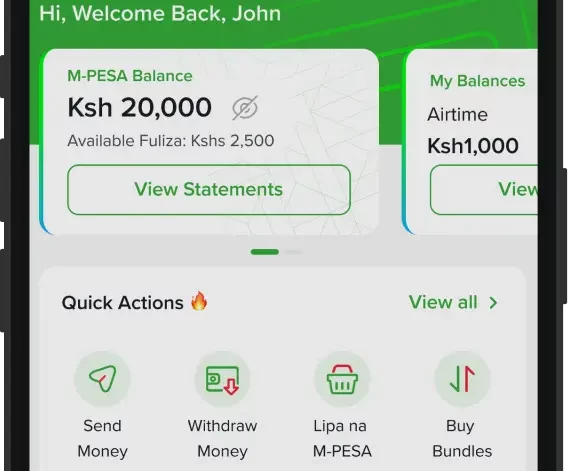
Imagine having to jump from one mobile app to another just to complete everyday tasks such as sending money, buying data bundles, checking your airtime balance or accessing customer support.
It is a routine many smartphone users have grown accustomed to over the years. But as digital banking and mobile connectivity continue to evolve, the focus is shifting from juggling multiple applications to accessing everything from a single platform.
Safaricom is leading this shift with My OneApp, a unified platform that combines the capabilities of the M-PESA App and the mySafaricom app into a single digital experience.

Instead of maintaining two separate applications, customers can now access M-PESA financial services alongside Safaricom connectivity services, including airtime, voice minutes, SMS, data bundles, Bonga rewards, M-Shwari, and ZiiDi, all from one application.
The integrated platform is designed to provide a smoother and more personalised experience, for customers seeking Safaricom services.
At its core, My OneApp is designed to make everyday digital transactions easier. Customers can send and receive money, purchase airtime and bundles, check balances, access statements, manage subscriptions and explore additional digital services without leaving the application.
The platform also extends beyond traditional mobile money by integrating home fibre management, customer care tools and a growing ecosystem of third-party mini apps covering sectors such as investments, credit, transport and entertainment.
Users can also customise the application’s homepage by selecting frequently used services under Quick Actions, making commonly accessed features easier to reach.
A global search function further simplifies navigation by enabling customers to quickly locate services across the platform.
Security takes centre stage
As digital transactions continue to grow, security has become a major concern for mobile users.
To ensure customers are protected, My OneApp requires users to insert the registered SIM card in the device before the application can function.
The additional layer of verification is intended to reduce fraud and strengthen customer protection.
The app also includes a dedicated Security Centre where customers can report suspected fraud, retrieve their PUK numbers, manage subscriptions and monitor their lines.
AI-powered support and smarter payments
Beyond traditional mobile banking services, My OneApp introduces new digital capabilities aimed at improving customer convenience.
Users can access Zuri, Safaricom’s AI-powered virtual assistant, for customer support, while Scan-to-Pay allows merchants and customers to complete payments by scanning QR codes.
The platform also incorporates AI Pay and an in-app chat feature, reflecting the growing use of artificial intelligence to simplify financial transactions and customer engagement.
Features available on My OneApp
Among the services customers can access through the platform are:
- M-PESA transactions, balances, statements and Pochi Wallet.
- Airtime purchases, voice bundles, SMS and data bundles.
- Home Fibre account management.
- Bonga rewards, M-Shwari and ZiiDi services.
- Quick Care services, including Security Centre, fraud reporting, PUK retrieval and line management.
- Scan-to-Pay, AI-powered services and Zuri virtual assistant.
- Personalised Quick Actions for faster access to frequently used services.
- Mini Apps offering investment, credit, transport and entertainment services.
Who can use My OneApp?
My OneApp is available to all registered Safaricom customers using compatible Android, iOS or Huawei smartphones that support 4G connectivity and above.
Customers wishing to access M-PESA services through the platform must also be registered M-PESA users.
Safaricom customers living outside Kenya can also download or update the application while abroad by activating roaming services and ensuring their Safaricom SIM card is inserted as the primary SIM in their device.
How to download the My OneApp
To download or Update to the most current version:
- Open Play Store for Android, or APP Store for iOS
- Search for My OneApp
- Select Download or Update
- Proceed with log in
- Enter your M-PESA PIN
- You will receive a One Time Password (OTP) which will auto populate in the app
- Set up Biometrics
- The first-time of successful activation, customer is presented with a brief Tutorial, enlightening them on the main APP features and navigation.
App Sign up Tips
- Ensure Safaricom SIM card is present in the device, and it is set as the default SIM
- Ensure mobile data is enabled (sign up will not work on Wi-Fi)
Also Read: Safaricom tightens grip on Kenya’s fixed broadband market